| Multi-Pair Wire
& Cable (jack diagrams are below) |
Base
color/
Stripe color |
Polarity
(Tip is
Positive) |
Pair
# |
Pin #
in
25-pair
"Amphenol"
Connector |
Row # in
66
or 110
Punch-down
Block |
White/Blue
Blue/White |
Tip 1
Ring 1 |
Pair 1 |
26
1 |
1
2 |
White/Orange
Orange/White |
Tip 2
Ring 2 |
Pair 2 |
27
2 |
3
4 |
White/Green
Green/White |
Tip 3
Ring 3 |
Pair 3 |
28
3 |
5
6 |
White/Brown
Brown/White |
Tip 4
Ring 4 |
Pair 4 |
29
4 |
7
8 |
White/Slate
Slate/White |
Tip 5
Ring 5 |
Pair 5 |
30
5 |
9
10 |
Red/Blue
Blue/Red |
Tip 6
Ring 6 |
Pair 6 |
31
6 |
11
12 |
Red/Orange
Orange/Red |
Tip 7
Ring 7 |
Pair 7 |
32
7 |
13
14 |
Red/Green
Green/Red |
Tip 8
Ring 8 |
Pair 8 |
33
8 |
15
16 |
Red/Brown
Brown/Red |
Tip 9
Ring 9 |
Pair 9 |
34
9 |
17
18 |
Red/Slate
Slate/Red |
Tip 10
Ring 10 |
Pair 10 |
35
10 |
19
20 |
Black/Blue
Blue/Black |
Tip 11
Ring 11 |
Pair 11 |
36
11 |
21
22 |
Black/Orange
Orange/Black |
Tip 12
Ring 12 |
Pair 12 |
37
12 |
23
24 |
Black/Green
Green/Black |
Tip 13
Ring 13 |
Pair 13 |
38
13 |
25
26 |
Black/Brown
Brown/Black |
Tip 14
Ring 14 |
Pair 14 |
39
14 |
27
28 |
Black/Slate
Slate/Black |
Tip 15
Ring 15 |
Pair 15 |
40
15 |
29
30 |
Yellow/Blue
Blue/Yellow |
Tip 16
Ring 16 |
Pair 16 |
41
16 |
31
32 |
Yellow/Orange
Orange/Yellow |
Tip 17
Ring 17 |
Pair 17 |
42
17 |
33
34 |
Yellow/Green
Green/Yellow |
Tip 18
Ring 18 |
Pair 18 |
43
18 |
35
36 |
Yellow/Brown
Brown/Yellow |
Tip 19
Ring 19 |
Pair 19 |
44
19 |
37
38 |
Yellow/Slate
Slate/Yellow |
Tip 20
Ring 20 |
Pair 20 |
45
20 |
39
40 |
Violet/Blue
Blue/Violet |
Tip 21
Ring 21 |
Pair 21 |
46
21 |
41
42 |
Violet/Orange
Orange/Violet |
Tip 22
Ring 22 |
Pair 22 |
47
22 |
43
44 |
Violet/Green
Green/Violet |
Tip 23
Ring 23 |
Pair 23 |
48
23 |
45
46 |
Violet/Brown
Brown/Violet |
Tip 24
Ring 24 |
Pair 24 |
49
24 |
47
48 |
Violet/Slate
Slate/Violet |
Tip 25
Ring 25 |
Pair 25 |
50
25 |
49
50 | |
| | |
| Modular Jacks & Plugs |
Jacks and plugs are wired to
conform to Uniform Service Ordering Code ("USOC") numbers, originally developed
by the Bell System, and endorsed by the FCC. One specific piece of hardware can
be wired in different ways, and have different USOC numbers. USOC has become an
acronym, pronounced "you-sock," and jack wiring schemes are generally referred
to as "USOC codes." |
 |
 |
The 8-position modular jack (above) is commonly and
incorrectly referred to as “RJ45”. The 6-position modular jack is commonly
referred to as RJ11, which may or may not be correct. Using RJ terms often leads
to confusion since the RJ designations refer to very specific USOC wiring
configurations. The designation ‘RJ’ means Registered Jack, and should be used
only for jacks that are connected directly to phone company circuits.
Each of the basic jack styles can be wired for different RJ
configurations. For example, the 6-position jack can be wired as an RJ11C
(1-pair), RJ14C (2-pair), or RJ25C (3-pair) configuration. An 8-position jack
can be wired for configurations such as RJ61C (4-pair) and RJ48C. The keyed
8-position jack can be wired for RJ45S, RJ46S, and RJ47S. The fourth modular
jack style is a modified version of the 6-position jack (modified modular jack
or MMJ). It was designed by Digital Equipment Corporation (DEC) along with the
modified modular plug (MMP) to eliminate the possibility of connecting DEC data
equipment to voice lines and vice versa. (This paragraph is based
on info from Siemon, a supplier of much of
the telecom hardware we use and sell.)
In the diagrams below, you are looking into the opening of the
jack. Internal wiring in the jack may have different colors from the wiring that
goes to the jack. |
|
 |
6 Positions
2 or 4 Wires
1 or 2 Lines
RJ11
or RJ14 | |
Jack
Positions |
USOC
RJ11 |
USOC
RJ14 |
|
| 2 |
|
wht/org |
|
| 3 |
blue/wht |
blue/wht |
|
| 4 |
wht/blue |
wht/blue |
|
| 5 |
|
org/wht |
|
 |
6 Positions
6 Wires
3
Lines
RJ25 | |
Jack
Positions |
USOC
RJ25 |
| 1 |
wht/grn |
| 2 |
wht/org |
| 3 |
blue/wht |
| 4 |
wht/blue |
| 5 |
org/wht |
| 6 |
grn/wht | |
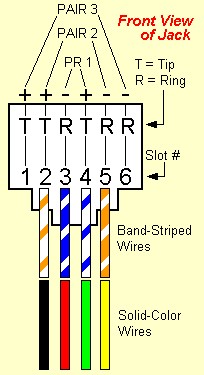
|
Wires inside most phone jacks are usually solid-
colored, not striped.
Until a few years ago, it was customary to use "quad"
solid- color wire, that matched the wires inside a jack.
If you are installing a new jack, it's best to use
"twisted-pair" wire, with
stripes. | |
 |
8 Positions
4 or 8 Wires
4
Lines
RJ61 & others | |
Jack
Positions |
USOC
RJ61 |
T568A |
T568B
(AT&T) |
10BASE-T
(LAN) |
| 1 |
wht/brn |
wht/grn |
wht/org |
wht/blue |
| 2 |
wht/grn |
grn/wht |
org/wht |
blue/wht |
| 3 |
wht/org |
wht/org |
wht/grn |
wht/org |
| 4 |
blue/wht |
blue/wht |
blue/wht |
|
| 5 |
wht/blue |
wht/blue |
wht/blue |
|
| 6 |
org/wht |
org/wht |
grn/wht |
org/wht |
| 7 |
grn/wht |
wht/brn |
wht/brn |
|
| 8 |
brn/wht |
brn/wht |
brn/wht |
| |
 Note: If you are
going to re-use jacks previously installed for a Merlin or other
ATT/Lucent/Avaya phone system that uses the T568B wiring scheme, you will either
have to re-arrange the wires inside the jack, or connect the circuit that would
normally go on the white/orange wire pair, to the white/green
pair. Note: If you are
going to re-use jacks previously installed for a Merlin or other
ATT/Lucent/Avaya phone system that uses the T568B wiring scheme, you will either
have to re-arrange the wires inside the jack, or connect the circuit that would
normally go on the white/orange wire pair, to the white/green
pair. |
| Note:
8-position jacks and plugs used in Local Area Networks ("LANs") are commonly
referred to as RJ45. This is incorrect, because RJ designations apply only to
jacks connected to phone company circuits, not PCs or network hubs.
|
| The black
diagrams and some of the info above came from Hubbell, a maker of top-quality
wiring devices. We thank
them. | |
