|
|
568-B |
568-A |
RJ45 Wiring Standards
Network cabling done today uses Unshielded Twisted Pair (UTP) wiring. Use Category 5. Supports upto 100 megabit per second data transmission also known as CAT5.
CAT5 UTP cable contains "4 twisted pairs" of wires, a total of 8 wires. The strands that constitute each wire will either be a single strand or multiple strands, usually referred to as solid or flex. Typically the solid is used to run through walls and ceilings and the flex is used to make drop cables (the cable from the wall plate to the desktop computer) and patch cables (the cable from the patch panel to the hub). Whether the exterior portion of the cable that contains the 4 twisted pairs, the jacket, is Plenum grade or Non-plenum grade is very important, it refers to the Fire Codes.
Connectors
The cable connectors and jacks that are most commonly used with CAT5 UTP cables are RJ45. The RJ simply means Registered Jack and the 45 designation specifies the pin numbering scheme. The connector is attached to the cable and the jack is the device that the connector plugs into, whether it is in the wall, the network interface card in the computer, or the hub.
Ordering Pairs
The pairs of wires in UTP cable are colored so that you can identify the same wire at each end. They are color coded by pair so that the pairs can also be identified from end to end. Typical CAT5 UTP cables contain 4 pairs made up of a solid color and the same solid color striped onto a white background. The most common color scheme is the one that corresponds to the Electronic Industry Association/Telecommunications Industry Association’s Standard 568B
|
|
568-B |
568-A |
Note: This is the only place I have showed 568A (in case you ever encounter 568a) however colors are substitutable below.
Eight-conductor data cable contains 4 pairs of wires. Each pair consists of a solid (or predominantly) colored wire and a white wire with a stripe of the same color. The pairs are twisted together. To maintain reliability on Ethernet, you should not untwist them any more than necessary (like about 1 cm).
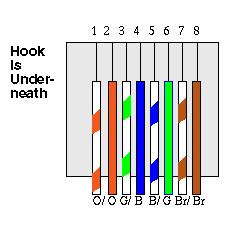
There are two wiring standards for these cables, called
"T-568A" and T-568B" They differ only in
connection sequence, not in use of the various colors. The
illustration shown is for T-568B. The pairs designated for
10BaseT Ethernet are Orange and Green. The other two pairs, Brown
and Blue, can be used for a second Ethernet line or for phone
connections.
Note that the Blue pair is on the center pins and
conveniently corresponds to the Red and Green pair in a normal
phone line. The connections shown are specifically for an RJ45
plug (the thing on the end of the wire). The wall jack may be
wired in a different sequence because the wires are actually
crossed inside the jack. The jack should either come with a
wiring diagram or at least designate pin numbers that you can
match up to the color code below.
Pin Number Designations
There are pin number designations for each color in T568B. The pin designations are as follows:
   Color Codes for T568B
Pin     color  pair  name
---     -----  ---- ---------
1       wh/or   2   TxData +
2       or      2   TxData -
3       wh/grn  3   RecvData+
4       blu     1
5       wh/blu  1
6       grn     3   RecvData-
7       wh/brn  4
8       brn     4
Note that the odd pin numbers are always the white with stripe color.
Wiring Diagrams for Straight Through, Cross Over and Y cables
Note: The hook is
underneath in all cases and Pin one is always on the Left
| Straight Through Cable | Color Code | Color |
| Pin 1 Pin 2 Pin 3 Pin 4 Pin 5 Pin 6 Pin 7 Pin 8 |
white orange orange white green blue white blue green white brown brown |
        |
| Cross Over Cable | Color Code | Color |
| Pin 1 Pin 2 Pin 3 Pin 4 Pin 5 Pin 6 Pin 7 Pin 8 |
white green green white orange blue white blue orange white brown brown |
|
| The other side is a straight through cable see Straight through diagram | ||
| Y Cable | Color Code | Color |
| Pin 1 Pin 2 Pin 3 Pin 6
|
white orange orange white green green
|
|
| The other side is a straight through cable see Straight through diagram | ||

